Zymtrace Agent Skills: Profile-Guided Optimization for AI Coding Agents
Install the Zymtrace Agent Skills in Claude Code, OpenAI Codex, or Cursor to investigate CPU & GPU bottlenecks, apply fixes, and benchmark the results.


Israel Ogbole
Your coding agent can now manage Zymtrace and analyse your code to find and fix CPU and GPU performance bottlenecks.
The Zymtrace Agent Skills provide the workflows and performance-engineering knowledge, while the zymtrace-perf-engineer subagent can run the optimization workflow end to end.
It reads inference-engine, host, and GPU performance metrics, correlates them with CPU and GPU profiles, identifies the bottleneck, prepares the relevant configuration or code changes for your approval, and benchmarks the result.
All without leaving the coding agent.
This started with something our users were already doing. They were asking their coding agents to install and upgrade Zymtrace, and the agents were figuring it out by reading our documentation and making educated guesses about the workflow.
It worked, but not always reliably.
So we leaned in. We wrote explicit skills for the tasks users were already asking agents to perform, expanded our MCP surface from 4 tools to 20+, and packaged everything as Agent Skills, a lightweight, open format for extending AI agents with specialized knowledge and repeatable workflows.
claude plugin marketplace add zystem-io/zymtrace-skills
claude plugin install zymtrace@zymtrace-skills
Codex and Cursor are covered in Install below.
The skills are powered by more than 20 Zymtrace MCP tools. The skills provide the workflows and performance-engineering knowledge, while the MCP tools provide the evidence: inference-engine, host, and GPU metrics, CPU and GPU profiles, and runtime and deployment context.
The optimization skills follow a consistent workflow: gather the relevant metrics and profiles, correlate the signals, identify the bottleneck, prepare a fix for approval.
Although the skills support both general-purpose and GPU-accelerated workloads, we will use GPU optimization as the example.
Connecting GPU perf metrics to profiles
GPU and inference-engine metrics tell you what is happening, not why a workload is slow. A GPU can sit underutilized for very different reasons: poor batching, queue starvation, CPU orchestration, memory pressure, synchronization, inefficient kernels, routing imbalance, or inter-GPU communication, and the metrics alone won’t tell them apart.
The profiles hold the evidence, but correlating it for every workload takes time. That is the work the optimize-gpu-workloads skill does. Using the Zymtrace MCP tools, it pulls together:
- GPU metrics, from utilization to SM efficiency and Tensor Core activity
- Inference-engine telemetry from vLLM, SGLang, and NVIDIA Dynamo-Triton
- CPU and GPU flamegraphs showing where time goes
- NVTX annotations, when enabled
- Workload, container, and deployment context
This allows the agent to distinguish a serving configuration problem from a host-side bottleneck, a memory-bound workload, or a kernel-level issue.
Two ways to run it
Interactive. Ask your coding agent to investigate a workload, and it will work through the skill step by step with you in the loop.
Hands-off. Hand the investigation to the zymtrace-perf-engineer subagent and let it run the workflow from end to end.
The subagent is built from what we have learned while optimizing GPU workloads with customers, together with the expertise of performance engineers on our team and across the field.
It uses the Zymtrace MCP tools to read the metrics, inspect the Zymtrace AI flamegraph, and cross-check the CPU profile using the same workload filters.
When NVTX is enabled, it can connect GPU kernels back to the model layer, inference phase, tensor shape, or custom operation that triggered them.
Once it identifies the bottleneck, it can prepare the relevant configuration or code changes, ask for approval, redeploy the workload, run the benchmark, and profile it again to verify the result.
Powered by the Model Context Protocol (MCP)
Zymtrace ships with a built-in MCP server. Every optimization skill runs on the MCP tools bundled in your self-hosted Zymtrace installation, so the same AI-driven debugging workflow runs across private-cloud, on-premises, and air-gapped environments.
The MCP server runs entirely on your infrastructure, so your data stays in your environment up to the point your coding agent reads it. What the agent then shares with its model provider is governed by the agent and model you choose.
Install
See the full Zymtrace AI Agent Skills documentation for setup and usage instructions.
Claude Code
claude plugin marketplace add zystem-io/zymtrace-skills
claude plugin install zymtrace@zymtrace-skills
OpenAI Codex
codex plugin marketplace add zystem-io/zymtrace-skillsThen install Zymtrace from /plugins.
Cursor
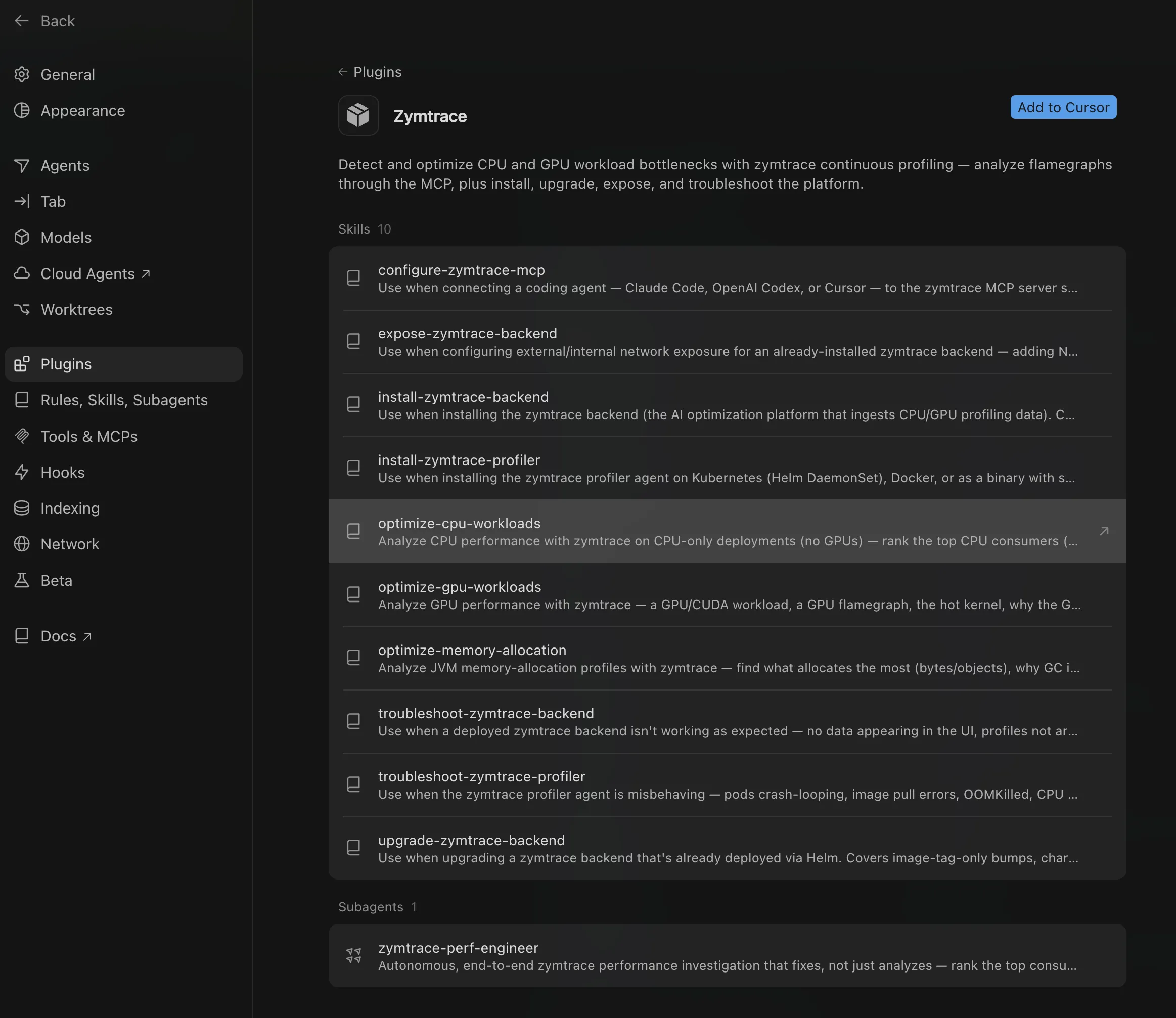
Import the marketplace from Settings → Plugins, then paste this link: https://docs.zymtrace.com/ai-agent-skills
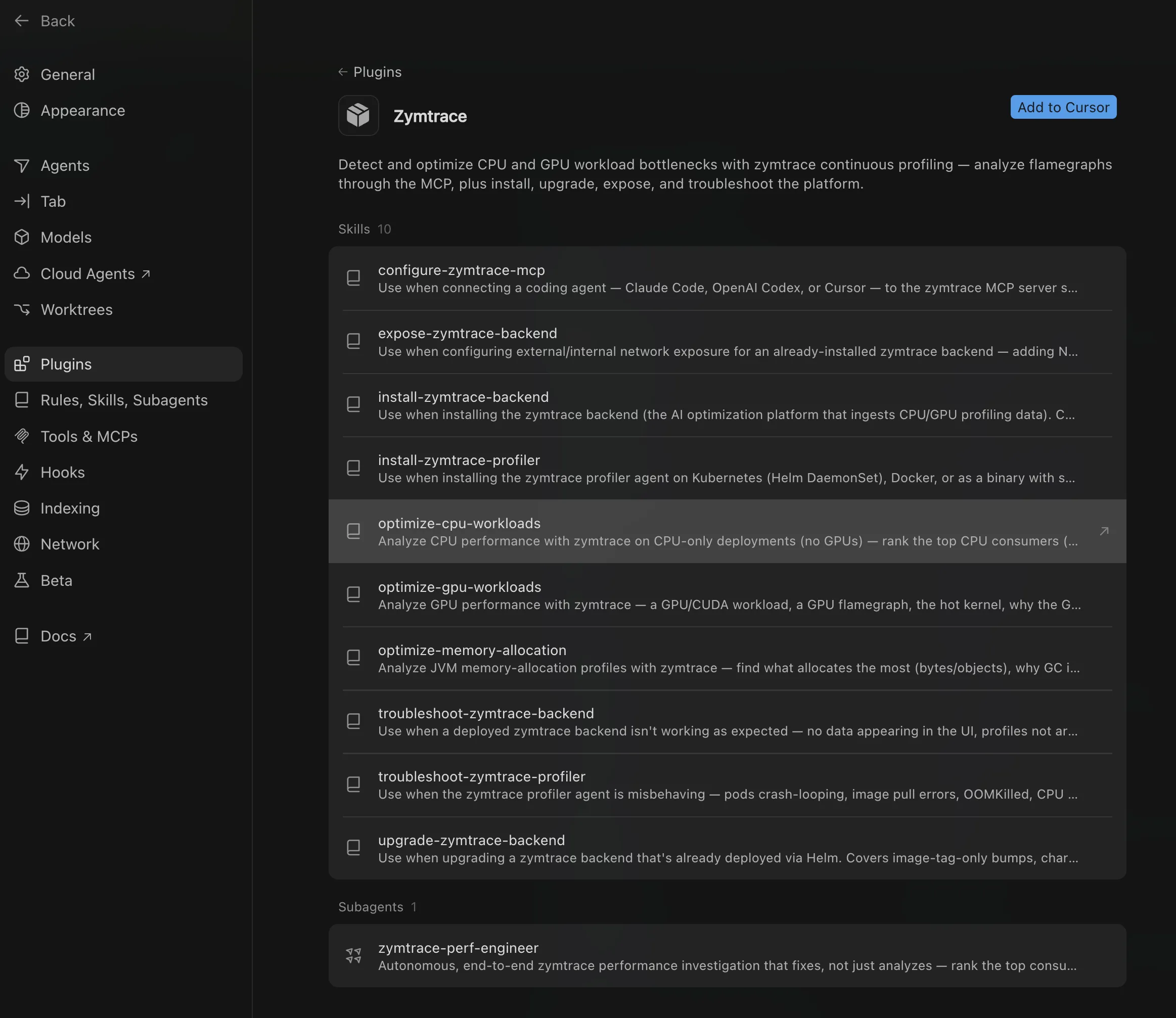
The Zymtrace plugin imported into Cursor.
Get started
Get started with Zymtrace at no cost.
Deploy Zymtrace, install the profiler, and give your coding agent the runtime context it needs to find bottlenecks, prepare fixes, and verify the result.


