AMD GPU profiling

Always-on ROCm profiling

A slow kernel tells you little without the code that launched it. Zymtrace reveals the calling stack and instruction-level stalls, including for vLLM and SGLang with HIP graphs, so your team knows where to optimize.
  • Fleet-wide
  • No code changes
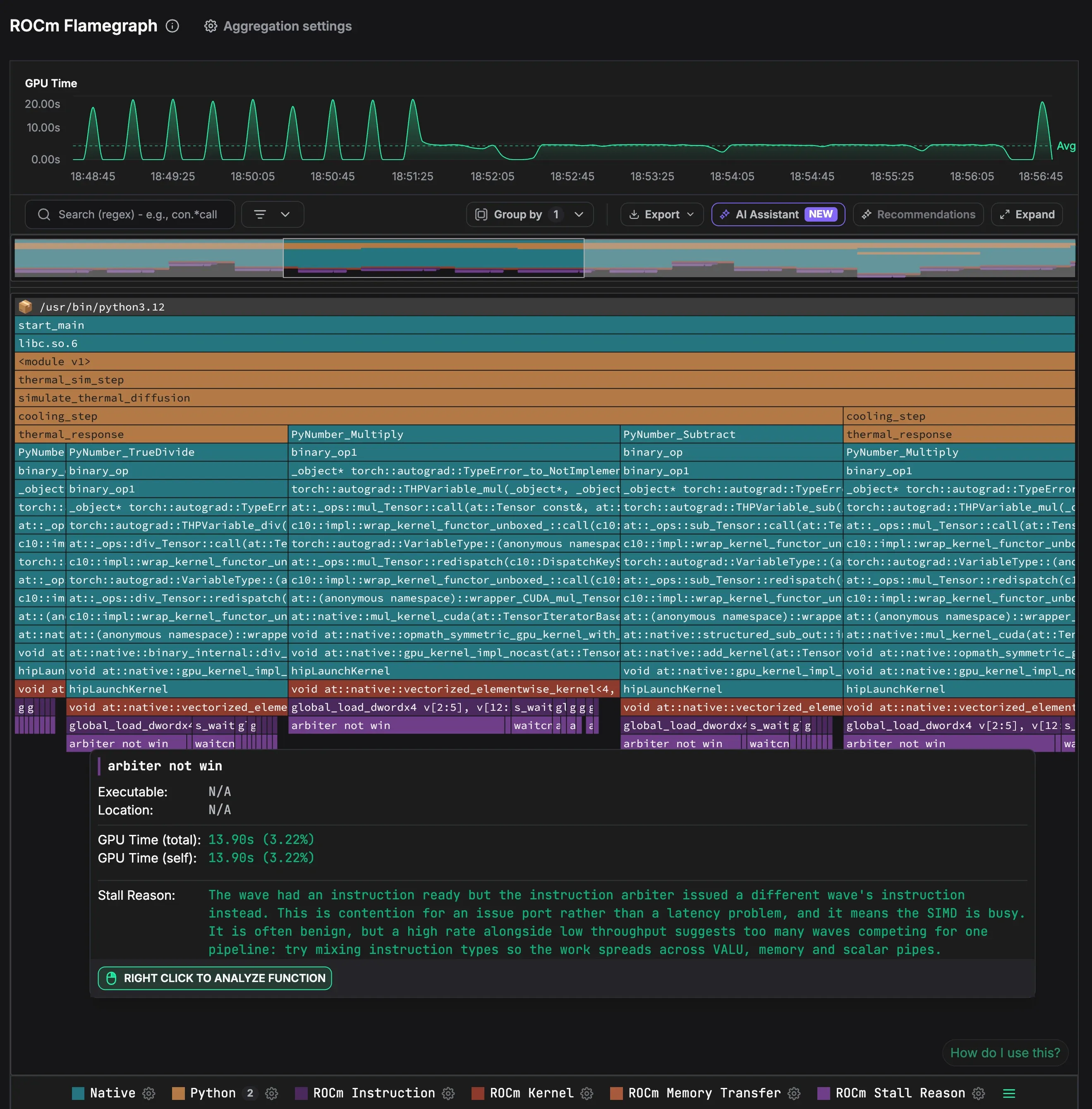
A ROCm flamegraph of a thermal simulation in python3.12: Python frames such as thermal_sim_step, simulate_thermal_diffusion and cooling_step above PyTorch frames, hipLaunchKernel, the vectorized elementwise kernels, their instructions such as global_load_dwordx4, and stall reasons. A tooltip on the arbiter not win stall reason shows 13.90 s of GPU time, 3.22%, and explains that the wave had an instruction ready but the arbiter issued another wave's instruction.
AMD SMI metrics

See the code behind any AMD GPU metric

Click any point on any AMD GPU chart to open the ROCm flamegraph of that moment.

  • Utilization and memory activity per device
  • Power against the power limit, temperature and clocks
  • Read from AMD SMI on each host
ROCm coverage

One profiler for NVIDIA and AMD

Built on the ROCprofiler SDK, with the same CPU context as CUDA profiles.

01

HIP kernels, fully symbolized

Full kernel names, such as rocBLAS GEMM TN [bf16xbf16→bf16, accum=f32].

02

Instructions and stall reasons

Instruction-level samples show where inside a kernel the time goes.

03

Memory and sync

Copies and synchronization as their own frames, next to compute.

04

ROCTX ranges

ROCTX ranges in the flamegraph, on by default.

05

Inference engines on ROCm

vLLM and SGLang, with HIP graphs and engine metrics.

06

One fleet view

AMD and NVIDIA hosts side by side in Efficiency IQ and Top Functions.

FAQ

AMD GPU profiling FAQ

AMD GPUs on x86_64 hosts with the amdgpu kernel driver and ROCm 7 or later, including the MI300X and MI325X.
Yes, once. ROCm profiling starts with the process, by setting ROCP_TOOL_LIBRARIES to the profiler library. Unlike CUDA, it can't attach to a process that is already running.
vLLM and SGLang, with HIP graphs. NVIDIA Dynamo-Triton and TensorRT-LLM are NVIDIA-only. See Inference.
AMD metrics are per device rather than per process, recommendations for ROCm are coming soon, and the GPU timeline is NVIDIA-only.

Profile your AMD fleet

Zymtrace is fully self-hosted. 5 minutes is all you need to get it up and running.